Designing an AI-native course authoring experience.
How I designed generative AI into an established authoring platform without taking authorship away from the people creating the learning.
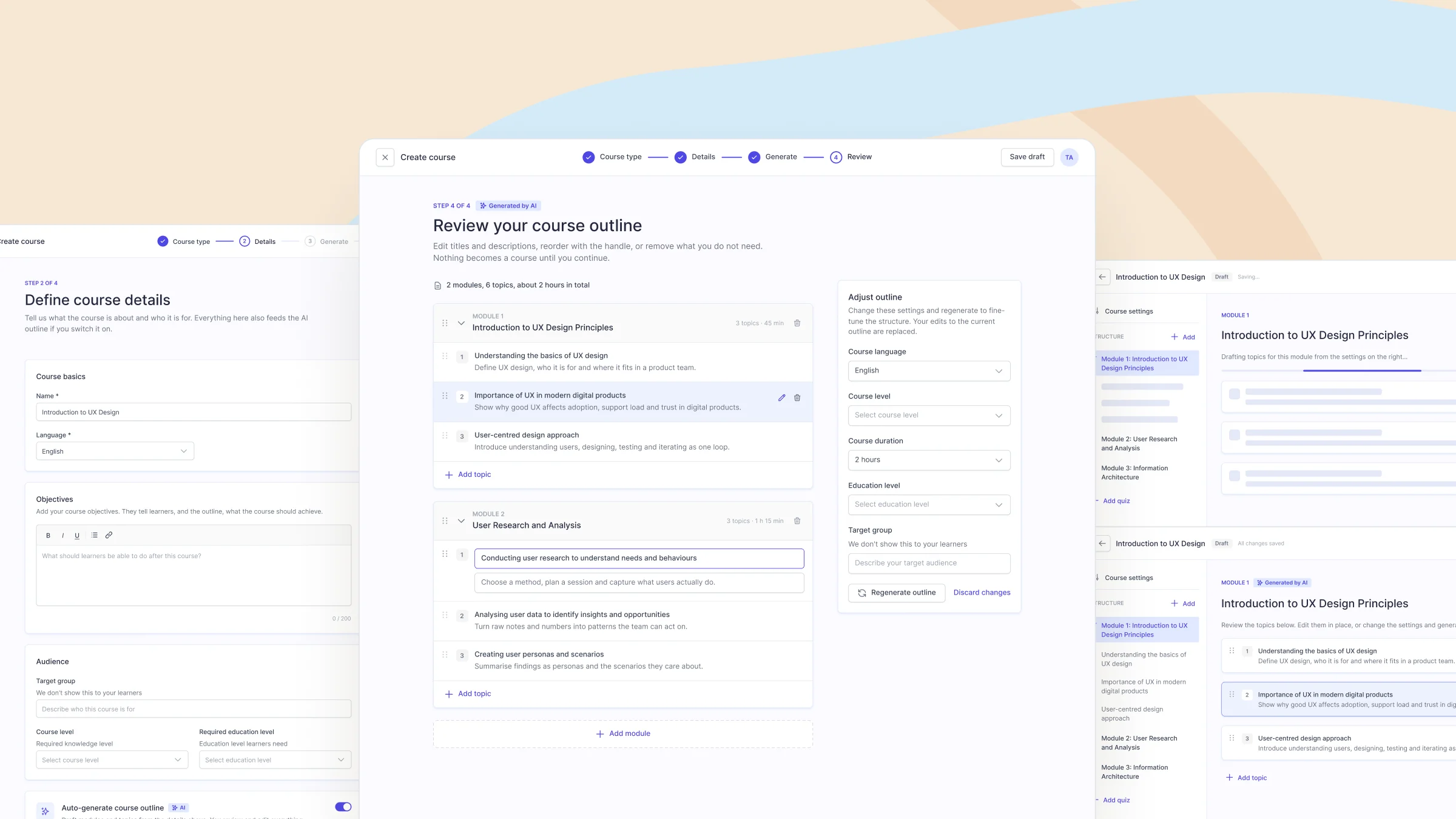
Context. Give the system enough to understand what the author intends to create.
Structure. Generate a representation of the course before the course itself.
The author reviews and changes the outline here
Content. Expand the approved structure into learning material, level by level.
- Role
- Product Designer, one of two, across the generation workflow, interaction model, author controls and editor integration
- Period
- 2023
- Status
- Shipped
- Collaborators
- 1 project lead, 1 product manager, 1 product designer, with engineering collaboration
- Research
- User interviews and customer feedback, including learning and development managers
- Generative layer
- ChatGPT models and integrations available at the time
Decisions here were made together. I say "we" for shared decisions and "I" only for my own role.
The question
Studytube already had a flexible authoring tool
Studytube is a learning management platform, and its course editor already let learning teams create, structure and edit their own courses. That flexibility was the asset, so AI was never going to be a patch for a weak editor.
The question generative AI raised was narrower: could it shorten the distance between an idea for a course and a draft worth continuing, without taking authorship away from the people creating the learning? What the editor already offered:
- Structure built from modules and topics.
- Explanations with text and media.
- Single choice, multiple choice and fill-in-the-blank questions.
- Text, document and video assignments.
- Forks, drafts, preview and publishing.
- Role
- Product Designer. One of two designers across the exploration and design of the authoring experience
- Company
- Studytube
- Period
- 2023
- Scope
- AI product design, generative workflows and authoring systems
- Worked with
- A second product designer, plus product and engineering
Creating a course starts before the writing
Before any content exists, an author is already deciding what the course is for and who it is for, what learners should understand afterwards, what belongs in it, how the ideas are grouped and sequenced, and how deep each part goes.
A language model can produce text, but text is one layer of the problem. The bigger opportunity was helping people move from an intention to a coherent structure they could keep shaping themselves.
How can AI help someone turn an intention into a useful course, while keeping the flexibility of the authoring environment they already have?
Customers wanted less effort, and wanted to keep their judgement
Our direction came from user interviews and ongoing customer feedback, including conversations with the learning and development managers who would use the tool.
Two things stood out. Customers were interested in reducing the effort of producing learning content, and in what AI could make possible for their organisations. That interest sat next to a clear need for judgement: they wanted to understand what was being created, decide whether it suited their people, and keep the freedom to change it.
What these conversations gave us was a design tension: how do we increase automation without reducing authorship?
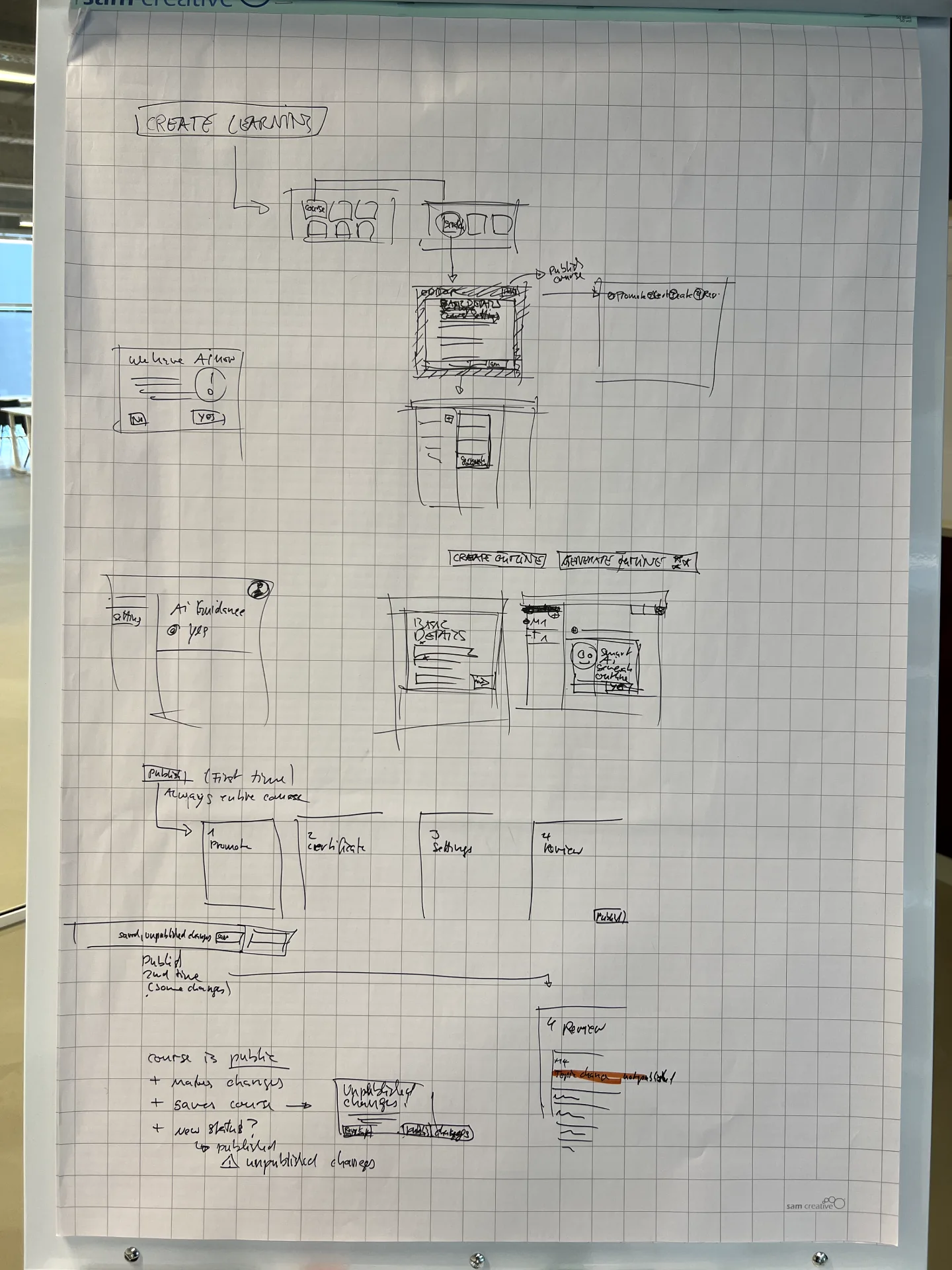
One-shot generation made mistakes expensive
The simplest workflow looked attractive: prompt, generate, course. But generation amplifies whatever assumptions the system makes at the start. If the model misreads the audience, focus or scope, that misreading runs through every section it writes, and the author only finds out when a large result arrives.
That gave us a constraint we kept returning to: the more content the AI was about to create, the more confidence the author needed in the decisions underneath it.
Four versions
Four versions, each answering a different question
I worked through four versions of the design. Each one asked where AI belongs in authoring, and the fourth is the final design. What follows is each version, and why it gave way to the next.
Version 4 is shown in Studytube's Endgame visual style, with its loading states added, and every chapter after this one shows that one design. Choose a version, scroll inside its window, and compare all four.
Five shifts
Across the versions, the question I was answering changed from where to put AI to when the author commits. Five changes account for most of what moved.
- Block to courseI moved AI from generating a paragraph to understanding a brief (version 1 to 2).
- Suggestion to proposalThe output became an object the author could review and commit to: the outline (version 2 to 3).
- Panel to flowI separated creating from editing, so each decision had its own moment (version 3 to 4).
- Free text to structureThe system always asked for context through fields, and I made the fields more specific (version 2 to 4).
- Spinner to stateThe wait became a state of its own: stages, a bar with a cube riding it, and a note that the details are saved as a draft (version 3 to 4).
The final design, from scratch to published
Version 4 is the final design, and the rest of this case study shows it. The window below is that design working: create from scratch, switch AI on, generate an outline, adjust it, open the editor and publish.
Press Watch and it plays itself with a cursor, or take over at any point and click through it yourself.
The final design, in order
The rest of this case study stays with the final design. It starts with the thinking that shaped it, then follows an author through it in the order they meet it: what the system asks for, the outline it proposes, how that outline is corrected, how the wait is handled, where the result lands, and how the course is published.
Who is in control, and when?
Across the versions, we arrived at a clearer relationship between the person creating the course and the system generating it. The model did not need to own the authoring process. It needed to help move the author forward.
I turned that into a simple interaction model: author intent, AI proposal, human judgement, AI expansion, human editing. Rather than gradually removing the person from the workflow, the system passes control back and forth, because a technically successful response can still be wrong for the learning context.
Generate progressively, not all at once
I split generation into increasingly consequential stages, so the author commits to the cheap representation before the expensive one.
Generation moves down a level
Generation did not stop at the outline. Version 3 carried it down a level, from the course outline to a topic outline, and in the final design I did the same for a module: the editor's panel generates its topics from settings the author can adjust first.
- Input
- Outline
- Correction
- The wait
- The editor
- Publishing
Start with context, not a prompt box
A blank prompt hands the user enormous theoretical flexibility, and a lot of responsibility. If good output depends on how well someone can talk to a language model, only some authors will get good output.
So there is no prompt box in any version. In the final design the flow starts by choosing a course type, and AI is not one of them: I made it a toggle on the details page, which asks for what the system needs through labelled fields. The principle: the quality of an AI experience should not depend on the user's knowledge of prompt engineering.
Every field is something the model needs. The form I designed asks for the course name and language, what the course is for, and who it is for in three separate fields. When AI is on, a line says what the outline will draw on, and files can be added as extra input. Nothing on the page asks the author to write a prompt.
- Input
- Outline
- Correction
- The wait
- The editor
- Publishing
Here is the course the AI intends to make. Is this the right direction?
Generate the structure before the course
The outline became the centre of my design and the most important part of the experience. Once the system understood the author's intention, it proposed a structure before producing the material.
That structure is an intermediate representation of what the AI believes the author wants: detailed enough to judge, light enough to change. An author can spot a missing topic, a section that does not belong, the wrong emphasis, poor sequencing, or an interpretation that simply is not theirs.
I changed the interaction from presenting a finished course to asking a question:
- Input
- Outline
- Correction
- The wait
- The editor
- Publishing
Editing the AI is part of the happy path
I did not treat intervention as failure recovery. Disagreeing with an output does not always mean the system failed; the author may simply have a different point of view.
So the experience I designed supports generating, inspecting, adjusting, regenerating where appropriate, and approving, without making correction feel exceptional. On the outline page every one of those controls sits on the row or beside the list, so correcting is as close to hand as reading.
- Input
- Outline
- Correction
- The wait
- The editor
- Publishing
Make the system's work visible
Generation takes time, and the result is uncertain. I treated it as a product state rather than a technical delay.
The interface says what is about to happen, shows that work is under way, keeps the author's inputs in view where it can, and returns the result for review.
A loader that shows direction
A bar alone says how far along the work is. A cube riding its leading edge says the work is still moving. The loader is a 2 by 2 by 2 cube that comes apart into its smaller cubes and builds itself back, four times in each loop.
The same cube marks the status chip on AI suggestions while they load.
Loader animation by Ision Industries, used with permission.
Suggestions wait too
Suggested objectives and audiences also take a moment to arrive, so they get states of their own: idle, loading, streaming, loaded and refreshing.
Skeletons hold the layout still, so nothing jumps when text arrives. Suggestions land one at a time. When the inputs change, the old ones dim instead of vanishing while new ones load.
- Input
- Outline
- Correction
- The wait
- The editor
- Publishing
AI changed how authors start, not what a course became
I designed the integration so that generated structure flows back into Studytube's existing authoring environment and becomes ordinary authoring material, with the tools authors already had.
The same modules and topics appear in the approved outline and in the structure rail, so authors keep working where they always worked.
- Input
- Outline
- Correction
- The wait
- The editor
- Publishing
Publishing is the last decision, so it has a flow of its own
None of the pages mentions AI. In my design, a course that began as a generated outline is published like any other, with the same pages and the same confirmation, so the last decision about a course stays with the author however the course was made.
Read together, the two ends of the work match. At the outline, the author approves the cheap representation before the expensive one is made. At publishing, the author approves what learners will receive, with who gets it stated again before it happens. Both follow one principle I held to: nothing consequential happens until the author has seen it.
The AI was a capability within the product, not the product itself
For the generative layer we used the ChatGPT models and integrations available at the time. The product was responsible for translating author intent into model input, orchestrating generation, and returning the output in a form that fits Studytube's existing course model.
The model handles generation. Studytube owns the authoring experience.
More than the ideal response
Traditional interfaces are largely deterministic. Generative ones are not. A model can return something valid but unhelpful, so I had to design for more than a single successful state.
The system is not just producing content. It is taking part in an iterative decision.
Course creation was one expression of the model
As the work developed, the opportunity moved beyond generating a course from scratch. The same principles can support other AI-assisted authoring capabilities: content enhancement, which the text actions already point to, and the broader project scope of curation and automation.
The reusable pattern is understand, propose, review, refine, commit. That moved the conversation from how we add an AI feature towards what an AI-assisted authoring system should look like.
What changed
AI became a credible way to start authoring
The flow I designed shipped, and customers and L&D managers responded positively because the experience made AI-assisted authoring tangible and opened up new possibilities for creating learning content for their people.
Instead of starting from an empty course and building everything by hand, they could start from an idea, let the system help establish a direction, and use their own expertise to shape the result.
Where the change landed
The outcome is a change in what customers could imagine, not a number.
Tangible
AI-assisted authoring became something customers and L&D managers could see, discuss and react to.
New possibilities
The experience opened up new ways of creating learning content for their people.
A different starting point
Authors begin from an idea, let the system propose a direction, and apply their own expertise to the result.
The important outcome was not that customers liked an AI feature. It was that the product helped them imagine a different relationship with content creation.
What the project taught me
What I would carry into the next AI-assisted product:
- Stage the commitment. Let the author approve the cheap representation before the expensive one is made.
- Expose the system's interpretation while it is still cheap to change.
- Ask for context through labelled fields, so the quality of the output does not depend on prompt skill.
- Make correction part of the happy path, not failure recovery.
- Treat generation as a product state, with expectations set and the work visible.
- Reuse the existing authoring model, so generated material becomes ordinary material.
Reflection
At the start it was easy to frame the opportunity as automation. The work led me to a different question: at which moments does human judgement matter most?
The outline became the critical control point in my design because it exposed the system's interpretation while it was still cheap to change, and customers were more comfortable exploring what generative AI could do when they stayed authors rather than recipients.
The design problem was never how much the model could generate. It was deciding when the system should act on its own, and when the person using it needs a chance to step in.
Before an AI system scales a decision, make the decision inspectable.